Sending Events to
SiteCensus From within a Flash Movie
The integration of the SiteCensus Tracking Code into your flash application, will enable NielsenOnline to record and monitor all flash activity within your movie/site. The tagging approach described below gives a flash developer the ability to send SiteCensus a data record on any event within a flash movie. An event could be sent if a user clicked a specific button, enabling unique browser tracking on that specific buttonclick. An event could be sent each time the content on the main stage was to change, thus enabling the ability to track 'page impressions' within a flash movie.
Sample Application:
To view the sample application click here.
To download the sample application click here.
The SiteCensus system also has the ability to track and report on the acvitivy of Streaming Video within a Flash movie. (This includes listing the streamname(s), number of unqiue browser views, and several duration based metrics.) That functionality is beyond the scope of this event tracking document and is discussed in more detail in the "Tracking Streams in Flash" Document.
Here is an
example of passing a record to SiteCensus when a user clicks a button within a flash movie:
on (release) {
|
The above piece of code executes when the user presses a specific button.
The scCG value is a grouping code which can be modified to suite your situation. You might want to set this value as the name of your flashmovie or the content of the movie. Here are some examples:
scCG=moviename.event;
scCG=homepageflashmovie.sports;
This Grouping Code can be utilized within the SiteCensus Reporting Tool as a way of separating data.
The scCI value should never be changed. This value is provided by your Technical Account Manager and tells the system where to send the data record.
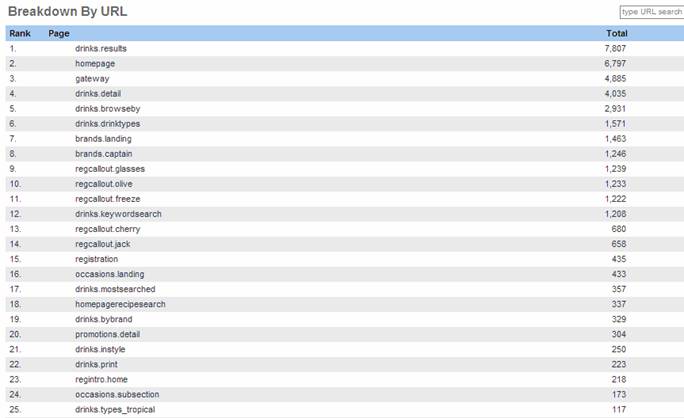
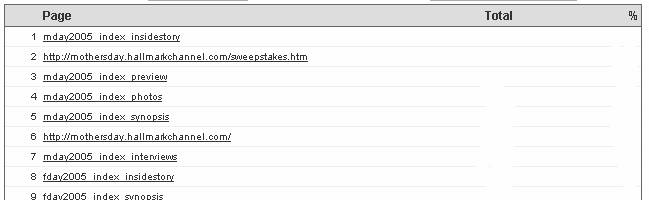
The scSI value is what will actually show up in the reporting interface when you run a page impression report. Our standard code when place on a website captures the page URL and displays it like this:
By passing a value to the scSI variable, you can decide what is displayed in this report. Here are two examples:
Calculating Movie Session Duration:
Our system calculates the length of time a user interacts with a specific flash movie by viewing the cookieID information, timestamp, and referring impression information for each data record sent to our servers. In order to set up duration calculation, your flash movie needs to include the scRP variable. The value of this variable should be the value of the previous records scSI variable.
When the user hits the main page of the flash movie, the scSI value might be:
scSI=”Home Page”
scRP=””
When the user moves to another ‘page’ in the flash movie (for example: ‘the pictures section’), the values passed would be:
scSI=”Pictures”
scRP=”Home Page”
Here is an example of the code:
on (release) { } |
.For support, please email the Technical Account Managment team at care-usa@netratings.com.